

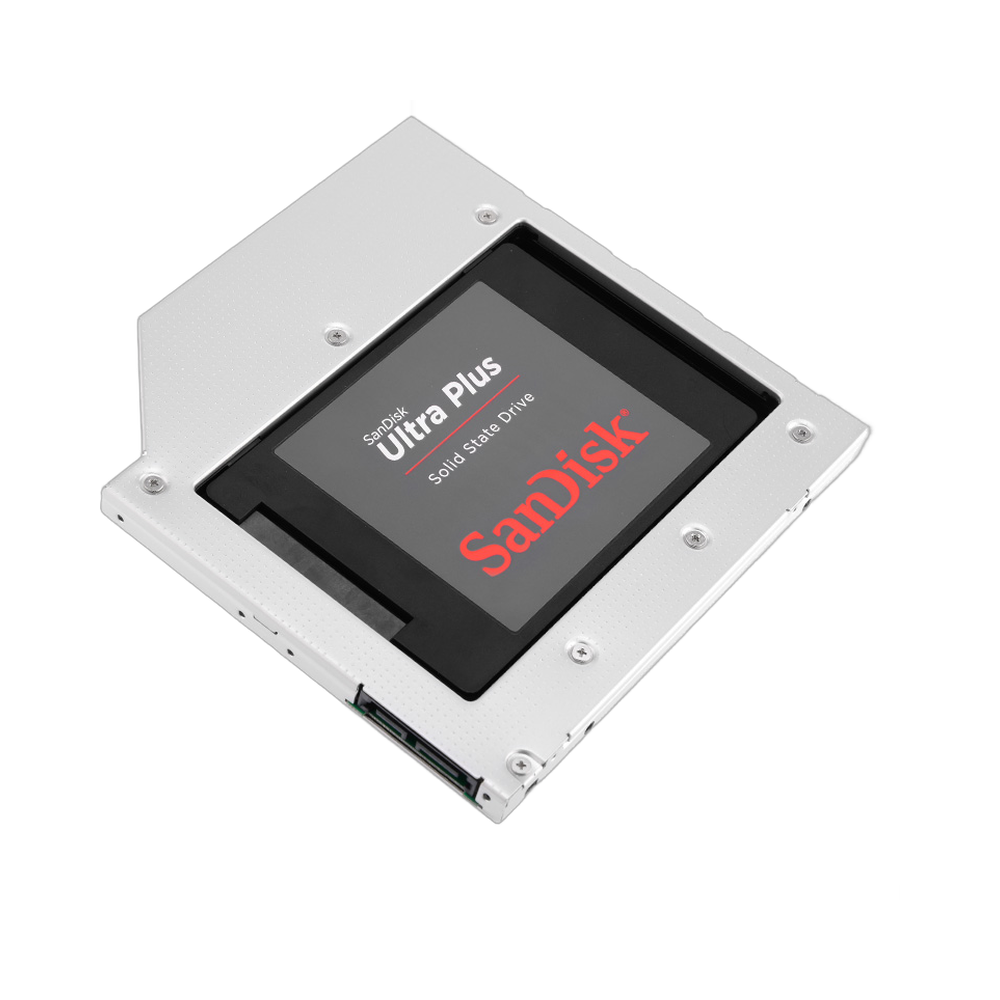
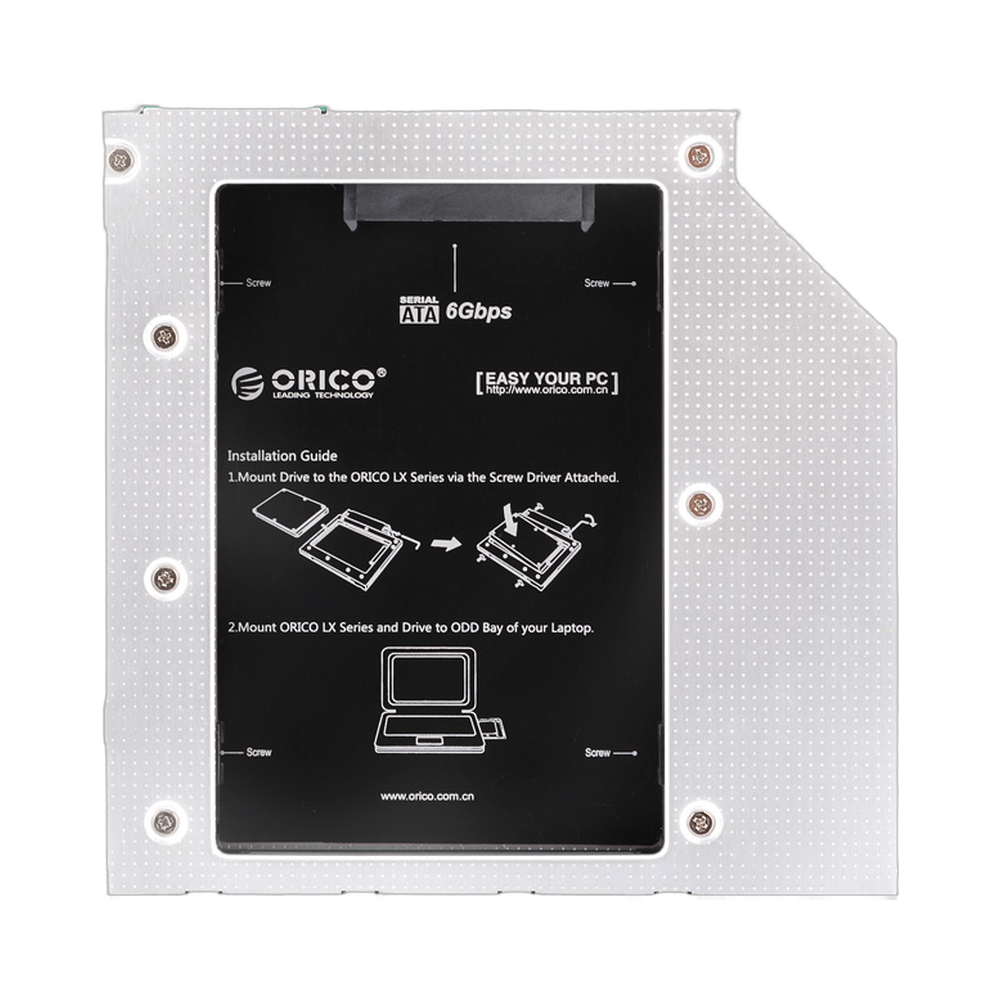
ORICO L95SS 9.5mm SATA III HDD SSD Caddy Tray | راك هارد سي دي اوريكو
Only 2 left in stock
- حامل أقراص صلبة SSD من نوع SATA III مقاس 9.5 مم من ORICO L95SS لفتحات الأقراص الضوئية في أجهزة الكمبيوتر المحمولة.
- يناسب فتحات محركات الأقراص الضوئية القياسية SATA CD/DVD-ROM مقاس 9.5 مم.
- يدعم محركات الأقراص الصلبة SATA و SSD مقاس 2.5 بوصة (بسماكة 7 مم و 9.5 مم).
- واجهة SATA III عالية السرعة بسرعات نظرية تصل إلى 6 جيجابت في الثانية.
- قم بتوسيع سعة تخزين جهاز الكمبيوتر المحمول الخاص بك باستخدام محرك أقراص ثانوي يصل إلى 2 تيرابايت.
- هيكل من الألومنيوم المتين والخفيف الوزن لتبديد الحرارة بشكل ممتاز.
- صينية ORICO L95SS 9.5mm SATA III HDD SSD Caddy Tray متوافقة مع معظم أجهزة الكمبيوتر المحمولة brands.
- يتضمن مفتاحًا متعدد القنوات لضمان توافق واسع.
- قم بتأمين محرك الأقراص الخاص بك باستخدام نظام التثبيت المرفق المكون من 4 براغي.
- يمكنك بسهولة إضافة محرك أقراص ثانٍ لتعزيز الأداء أو سعة التخزين.
- تُعد صينية ORICO L95SS 9.5mm SATA III HDD SSD Caddy Tray حلاً بسيطًا لترقية نظامك.
20,000 د.ع
Only 2 left in stock
Upgrade Your Laptop with the ORICO L95SS 9.5mm SATA III HDD SSD Caddy Tray
The ORICO L95SS 9.5mm SATA III HDD SSD Caddy Tray is the perfect solution for adding a second hard drive or a high-speed SSD to your laptop. By replacing your 9.5mm optical CD/DVD-ROM drive, this caddy allows you to significantly expand your storage capacity up to 2TB and boost system performance. It supports 2.5-inch SATA I, II, and III HDDs and SSDs with a thickness of 7mm or 9.5mm, connecting via a high-speed SATA III interface that delivers theoretical transfer speeds of up to 6 Gbps. The durable aluminum alloy construction ensures excellent heat dissipation and protects your drive.
High-Speed SATA III Performance
Unlock the full potential of your storage drives with the SATA III interface. The ORICO L95SS caddy supports transfer speeds up to 6 Gbps, ensuring that you get the maximum possible read and write performance from your SSD or HDD. This makes it ideal for running operating systems, applications, or games from the second drive, resulting in faster boot times and reduced loading screens.
Universal 9.5mm Compatibility
Designed for wide-ranging compatibility, this caddy fits most laptops that feature a 9.5mm CD/DVD-ROM optical bay. The ORICO L95SS 9.5mm SATA III HDD SSD Caddy Tray is compatible with major brands including Lenovo, Asus, Dell, HP, and Acer. A built-in multichannel switch helps prevent compatibility issues, ensuring a stable and reliable connection for your secondary storage.
Durable and Secure Aluminum Design
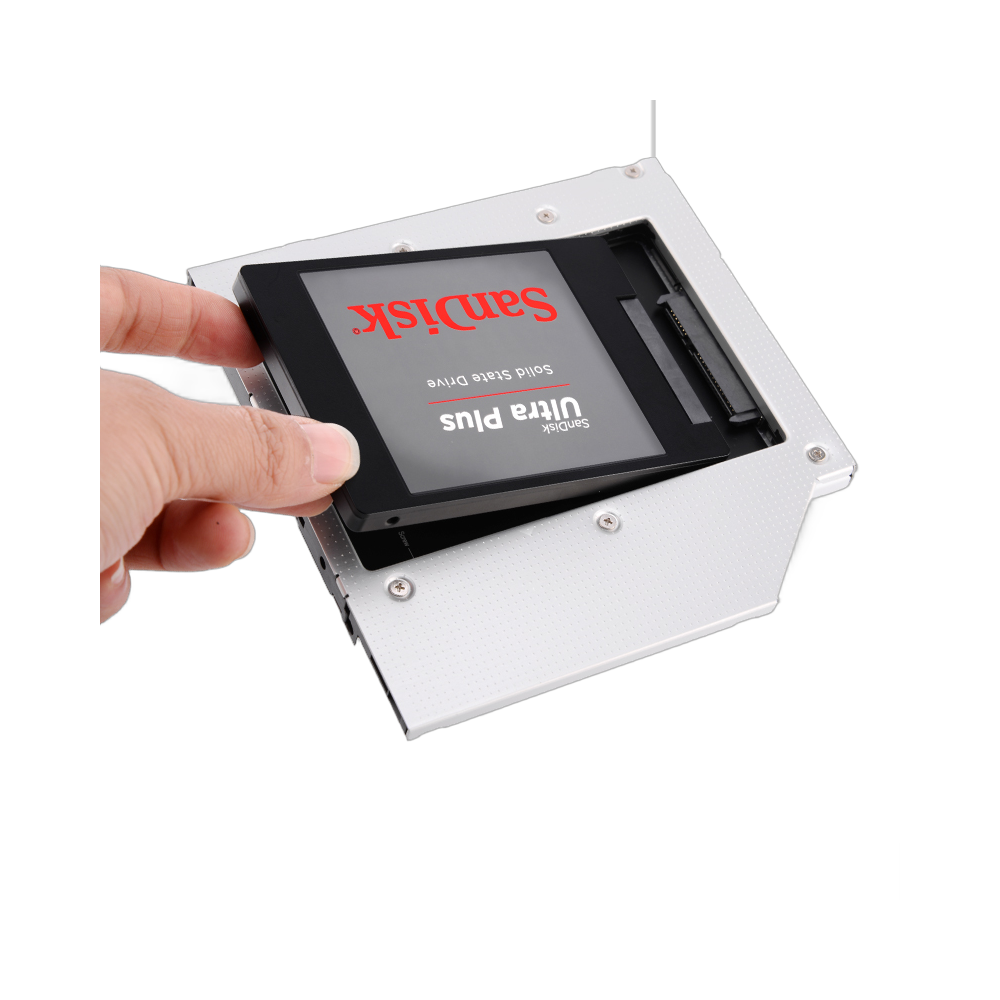
The chassis of the L95SS is crafted from a lightweight yet robust aluminum alloy. This material not only provides superior protection for your hard drive but also aids in heat dissipation, keeping your drive cool under load. For added security, the caddy includes four screws to firmly secure the 2.5-inch drive in place, preventing damage from vibrations or movement while using your laptop.
Simple and Seamless Installation
Upgrading your laptop is straightforward with the ORICO L95SS 9.5mm SATA III HDD SSD Caddy Tray. Simply remove your laptop’s existing optical drive, place your 2.5-inch HDD or SSD into the caddy, secure it with the provided screws, and slide the caddy into the vacant optical bay. This allows you to add up to 2TB of extra storage without complex modifications, giving your machine a new lease on life.
| العلامات التجارية | أوريكو |
|---|
| الطراز | ORICO L95SS |
| المواد | الألومنيوم |
| مدخل | SATA III, 6 Gbps (Theoretical Speed) |
| الناتج | 6 + 7PIN SATA CD-ROM Port of Laptop |
| Supported Hard Drive | 2.5 inch 7mm & 9.5mm SATA I, II, III HDD / SSD |
| Supported Laptops | Lenovo, Asus, Dell, HP, Acer and other laptops with 9.5mm CD-ROM optical bay |
| الطاقة الاستيعابية | Up to 2TB |
| الأنظمة المدعومة | Windows / MAC 9.1/10.2 or above |
Based on 0 reviews
Be the first to review “ORICO L95SS 9.5mm SATA III HDD SSD Caddy Tray | راك هارد سي دي اوريكو”
Related products
-
ملحقات الكمبيوتر, مكونات الحاسب الآلي, اجهزة التخزين الداخلي, التخزين
WD Purple WD22PURZ 2TB Surveillance 3.5 HDD | هارد داخلي
 ملحقات الكمبيوتر, مكونات الحاسب الآلي, اجهزة التخزين الداخلي, التخزين
WD Purple WD22PURZ 2TB Surveillance 3.5 HDD | هارد داخلي
- قرص صلب داخلي للمراقبة من نوع WD Purple بسعة 2 تيرابايت
- مصمم لأنظمة DVR و NVR الشائعة
- عامل شكل SATA مقاس 3.5 بوصة لأجهزة التسجيل المتوافقة
- معدل نقل البيانات يصل إلى 175 ميجابايت/ثانية
- ذاكرة تخزين مؤقتة بسعة 256 ميجابايت لأحمال عمل تخزين المراقبة
- تقنية تسجيل التصوير بالرنين المغناطيسي القلبي
- تقنية WD AllFrame لتسجيل فيديو مُحسّن
- يدعم معدل أحمال عمل يصل إلى 180 تيرابايت/سنة
- يدعم أنظمة مزودة بما يصل إلى 64 كاميرا عالية الدقة
- مصمم لأنظمة المراقبة التي تحتوي على ما يصل إلى 16 فتحة لمحركات الأقراص
SKU: P625 -
Case صندوق الحاسوب, مكونات الحاسب الآلي
ANTEC NX416L mid-tower ATX gaming case with mesh front and ARGB fans- كيس انتك
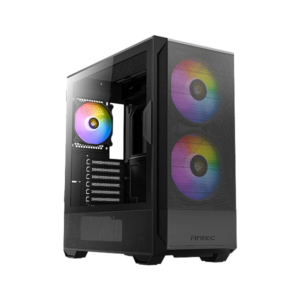 Case صندوق الحاسوب, مكونات الحاسب الآلي
ANTEC NX416L mid-tower ATX gaming case with mesh front and ARGB fans- كيس انتك
• علبة ألعاب ATX متوسطة الحجم بتصميم شبكي عالي التدفق للهواء
• مراوح ARGB مثبتة مسبقًا مع وحدة تحكم LED وPWM مدمجة
• لوحة جانبية زجاجية مقسّى قابلة للفتح لسهولة الوصول
• يدعم ما يصل إلى 11 مروحة بحجم 120 مم في وقت واحد
• دعم واسع النطاق للمبردات الهوائية والسائلة
• يدعم اللوحات الأم ATX و Micro-ATX و Mini-ITX
• مساحة لإدارة الكابلات تصل إلى 24 مم لتصميمات أنيقة
• منافذ إدخال/إخراج أمامية مزودة بمنفذ USB 3.0، ومنفذ Type-C، ووحدة تحكم LED، ومقبس صوتSKU: P1049 -
مكونات الحاسب الآلي, وحدة معالجة الرسوميات, NVIDIA
GPU ASUS RTX 4060 8GB OC DUAL – كارت شاشة نفيديا
- وحدة معالجة الرسومات NVIDIA GeForce RTX 4060 مع ذاكرة GDDR6 بسعة 8 جيجابايت
- تصميم ASUS ثنائي المروحة مع تبريد Axial-tech
- تم رفع تردد التشغيل في المصنع للحصول على أداء أعلى
- يدعم DLSS 3 وRay Tracing وNVIDIA Reflex
- تصميم مدمج بفتحتين ونصف مثالي للحالات الأصغر حجمًا
- BIOS مزدوج مع أوضاع الأداء والهدوء
- مخرجات HDMI 2.1a وDisplayPort 1.4a
- مُحسَّن للألعاب بدقة 1080 بكسل و1440 بكسل
SKU: P1016 -
المبردات الهوائية, مكونات الحاسب الآلي, مبردات الحواسيب المكتبية
ORICO M2HS2 M.2 SSD Heatsink with Copper Heat Pipe and Aluminum Fins | راك هارد ام دوت 2 اوريكو
 المبردات الهوائية, مكونات الحاسب الآلي, مبردات الحواسيب المكتبية
ORICO M2HS2 M.2 SSD Heatsink with Copper Heat Pipe and Aluminum Fins | راك هارد ام دوت 2 اوريكو
- مشتت حراري لمحركات أقراص الحالة الصلبة M.2 من نوع ORICO M2HS2، مصمم لمحركات أقراص الحالة الصلبة من نوع 2280
- يتميز بأنبوب حراري من النحاس النقي لامتصاص فائق للحرارة
- مصنوع من مشتت حراري من سبائك الألومنيوم مزود بـ 20 زعنفة لتبديد الحرارة
- يوفر تأثير تبريد يتراوح بين 10 و25 درجة مئوية
- مصمم لمحركات أقراص الحالة الصلبة M.2 NVMe 2280 أحادية الجانب
- يمنع مشتت الحرارة ORICO M2HS2 M.2 SSD التباطؤ الحراري
- أبعاد صغيرة تبلغ 76 × 24 × 10 مم لتوافق واسع
- تتضمن وسادات سيليكون حرارية لتحقيق التلامس الأمثل ونقل الحرارة
- يبدد الحرارة بكفاءة للحفاظ على أداء مستقر لمحرك الأقراص ذي الحالة الصلبة (SSD).
- يساعد هذا المشتت الحراري لمحرك الأقراص الصلبة M.2 SSD على إطالة عمر محرك الأقراص الخاص بك
- سهل التركيب في معظم تكوينات أجهزة الكمبيوتر المكتبية
SKU: P343



































 العربية
There are no reviews yet.